Ren'Py: Itch.io Update Notifcation Code
A downloadable source code
Overview
When creating a Ren'Py visual novel with multiple updates, one of the worries is that even if the players download one chapter, they won't know when to check for the next update
While social media updates help, most games automatically notify the player when their game needs updating (or updates it automatically). Ren'Py games don't export with that functionality, but it can be added in with relative ease
How to use
- Download the file or copy the code into your Ren'Py game folder
- Modify the url to your itch.io game page
- Feel free to modify as necessary
- Credit is appreciated
Requirements
- Ren'Py
- Versioned files / Butler pushing
- An itch.io game page
Code Logic
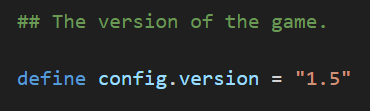
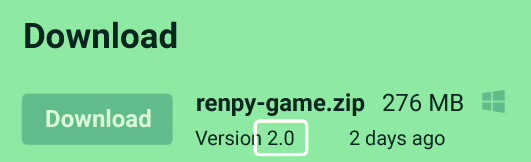
The basic logic is to take the game version stored in options.rpy and compare it to the file version on the itch.io Download page. If they don't match, the game notifies the player about an update
If you either:
- Don't update the config.version
- Don't have versioned filed
This code won't work as intended. It can be modified to work otherwise, but this code will assume the config.version is correct and the files are versioned
Python Functions
Start with an init python block. Import the packages requests (to get the itch.io page) and re (to find the version number).
init python:
     import requests
     import re
In the first function, check_itch_version, replace the variable url with the link to your game's itch.io page.
The programme uses request to call the url's html code. This is set to timeout after 1 second to avoid pausing the game for too long, but this can be extended to work on slower connections.
def check_itch_version():
        # Try to connect to the itch page and get the HTML code
        # Find the version number by the download links and return it
        try:
            # Replace the url with the link to your game's
            # itch.io page
            url = "https://<>.itch.io/<>"

            # Get the page in the form of the html code
            # Timeout after 1 second
            response = requests.get(url, timeout = 1)
            html = response.text
The version number is contained in the HTML:
<span class="version_name">Version 2.0</span>
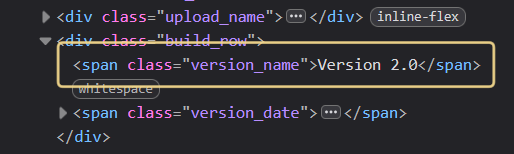
Regex can search through the HTML to identify the number between "Version" and "</span>"
Note: if you have multiple download files, multiple version numbers will be returned. Duplicates are filtered out.
# Find the text between "Version" and "<"
# Note: if you have multiple files, this will find
# multiple versions
version = re.findall(
    pattern = r'(?:Version )([^<]+)',
    string = html)

# Get list of unique versions
versions = []
for v in version:
    if v not in versions:
        versions.append(v)

# If the list of versions is not empty, return it
if len(versions) > 0:
    return [v.strip() for v in versions]
else:
    return None
check_itch_version returns either the version numbers found on the itch.io page or None if it fails. It can fail if:
- The itch.io page cannot be reached
- No version number can be found
check_for_updates compares the found itch.io version against the game version. By default this is config.version in options.rpy
The function returns an update message and a boolean variable confirming whether there is an update to download. Feel free to modify these messages
 def check_for_updates(current_version):
        itch_versions = check_itch_version()

        # If a version can't be found, return an error
        if itch_versions == None:
            update_message = "Could not check for updates"
            has_updated = True

        # Otherwise return whether the current version is up to date
        elif current_version not in itch_versions:
            update_message = f"An update is ready to download: v{itch_versions[0]}"
            has_updated = True
        else:
            update_message = "The game is up to date!"
            has_updated = False
        return update_message, has_updated
Notifcation Screen
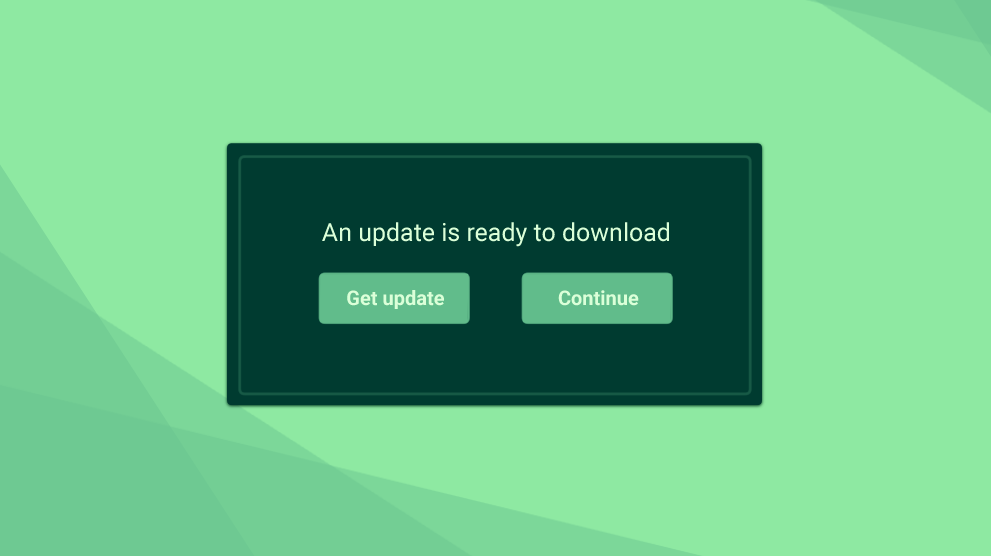
check_for_updates can be used as a function however you want in your game, but I've used it in a notification screen.
This is similar to the confirm screen in Ren'Py. It displays the update_message and if an update has been found, it wiill show a link to the itch.io page. Modify the url to suit your game
screen notify_update(update_message, has_updated):
    modal True
    frame:
        xalign 0.5 yalign 0.5
        vbox:
            style "confirm_prompt"
            xsize 700 ysize 300
            spacing 20

            # Display the update message
            text _(update_message):
                xalign 0.5 yalign 0.7
                text_align 0.5
                color gui.accent_color
            hbox:
                xalign 0.5
                spacing 150

                # If the game has updated, link to the itch.io page
                # Otherwise let the player continue
                if has_updated:
                    textbutton "Get update" action OpenURL("https://<>.itch.io/<>")
                textbutton "Continue" action [Hide("notify_update"), Return()]
Implementation in Ren'Py
To replicate loading/update screens, I've used the splashscreen label in Ren'Py to call the notify_update screen before the main menu is loaded
label splashscreen:
     $ update_message, has_updated = check_for_updates()
     call screen notify_update(update_message, has_updated) with Dissolve(0.1)
If you don't want to show the update screen if there's no update, add an if statement
label splashscreen:
    $ update_message, has_updated = check_for_updates(config.version)
    if has_updated:
        call screen notify_update(update_message, has_updated) with Dissolve(0.1)
Download
Install instructions
- Download and copy the file into your Ren'Py game folder
- Replace the urls with your game's itch.io page
- Modify as necessary
Thank you for downloading!
Development log
- Ren'Py Source Code79 days ago

Comments
Log in with itch.io to leave a comment.
Is there a link to the requirments?
As in to use it in your own project? It's just downloading the file and reading this tutorial to adjust it for your game
Is there anyway you could post a video on how to do this or know of a video that can help?